Migrating Zephyr Enterprise Integration for Jira Plugin
Zephyr Enterprise Integration for Jira Cloud plugin is available on Atlassian's Forge platform.
Migrate the plugin from Connect to Forge
Update your existing Connect-based plugin to the Forge version to continue receiving updates and support.
To update the plugin from Connect to Forge, do the following:
Log in to Jira as an administrator.
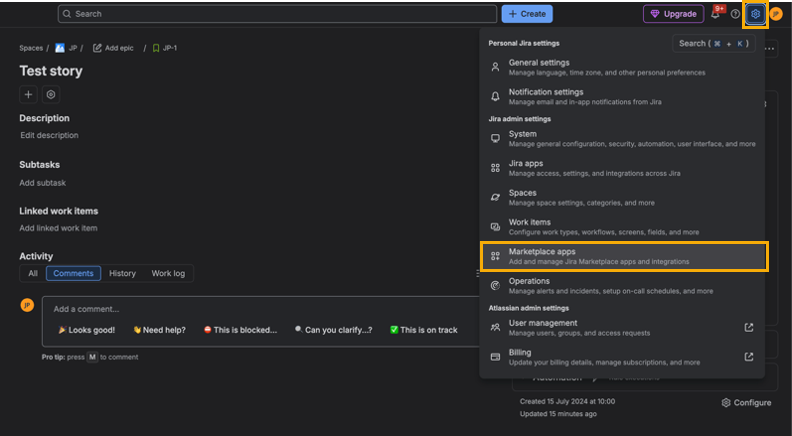
Click the settings icon and select Marketplace apps.
Click Take me there.
On the Connected apps screen, select View app details for Zephyr Enterprise Integration for Jira.
On the Zephyr Enterprise Integration for Jira screen, click Update.
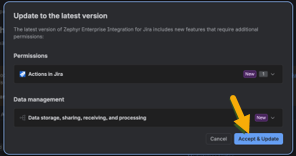
In the Update to the latest version dialog box, click Accept & Update.
Show Zephyr Enterprise traceability in Jira issue
By default, Zephyr Enterprise Traceability does not appear in Jira issues after migration. You must add it manually to each issue view.
Note
After installation, wait up to five minutes for Atlassian to grant the app the necessary permissions.
To display Zephyr Enterprise Traceability, do the following:
Open a Jira issue.
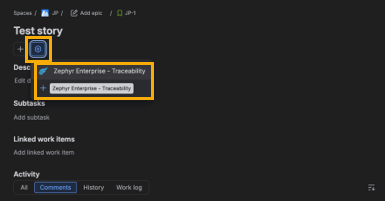
Click the Settings icon.
Select Zephyr Enterprise - Traceability.
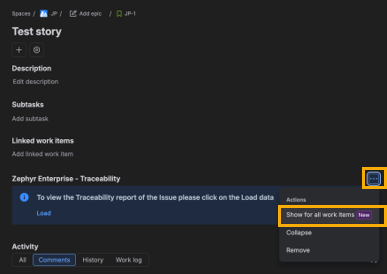
To apply this change to all issues, click the menu icon next to Zephyr Enterprise - Traceability and select Show for all work items.